3D Printing App

Printory – Inventory Management for 3D Printing

A mobile app for Android and iOS that tracks filament spools, colors, and usage through QR code scanning—built to validate camera workflows and establish reusable component patterns.

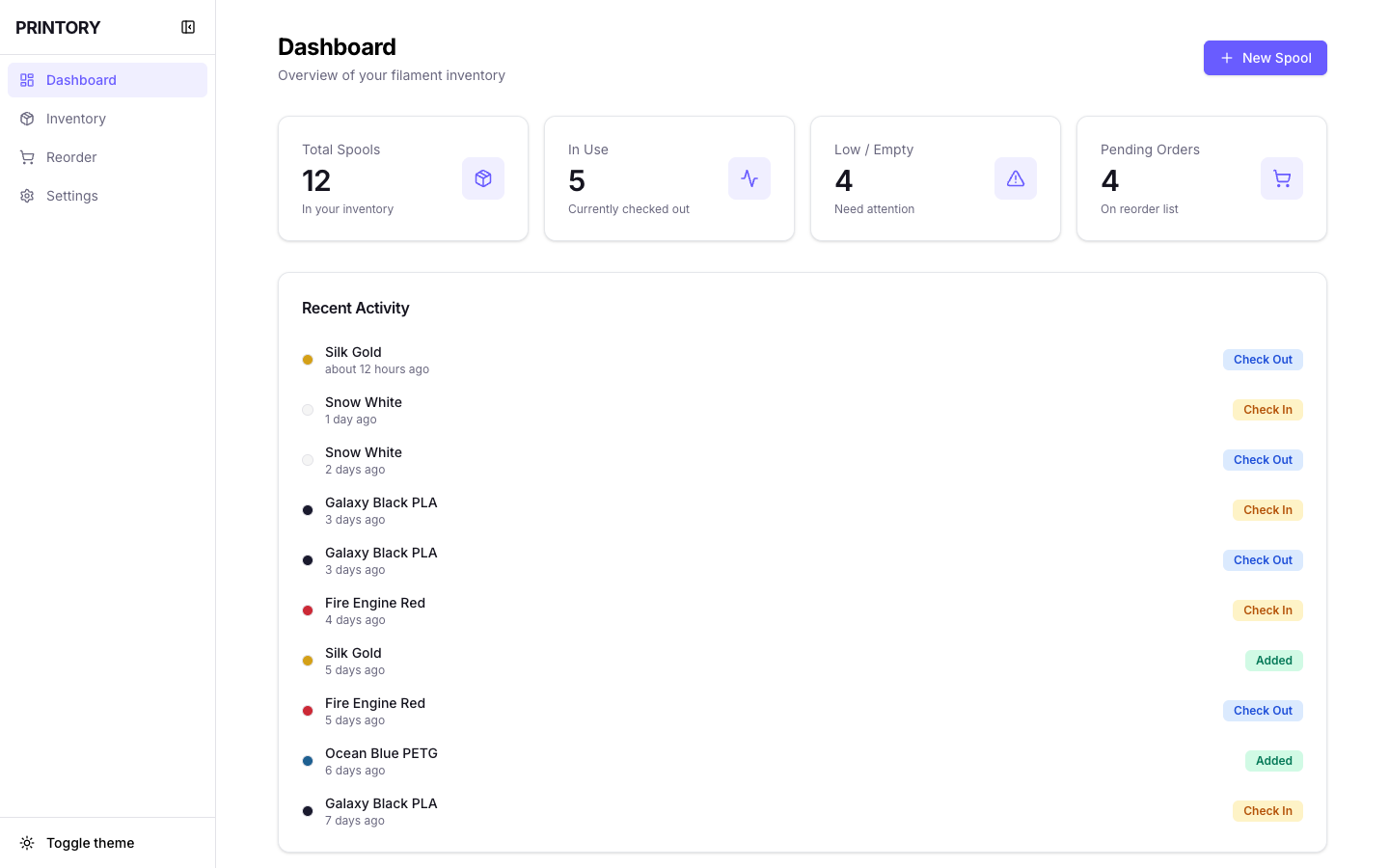
Printory app dashboard showing spool inventory management

Printory dashboard featuring Quick Actions, low stock alerts, analytics insights, and recent activity tracking.

Challenge

3D printing enthusiasts accumulate dozens of filament spools but have no easy way to track inventory—leading to wasted time searching for materials and discovering empty spools mid-print.

Solution

Created a frictionless mobile app with QR code scanning for instant spool identification, usage tracking, and low-stock alerts—validating camera workflows on real devices.

Key Result

Currently in closed testing on Google Play Store with 12 active users and 98% QR scan success rate—establishing reusable component architecture adapted by HydroMate and Verdant Lab.

My Role

Product Designer & Developer

Duration

2 Months

Platform

Android & iOS

Tools

Dart, Claude Code, Visual Studio, Gemini

Key Skills Demonstrated

This project showcases the intersection of enterprise design thinking and hands-on technical execution—validating patterns that inform both functional prototypes and professional enterprise work.

Deep Expertise

  • Reusable Design Systems

    Component architecture scaled across 3 apps (Printory → HydroMate → Verdant Lab)

  • Data Architecture

    Inventory data models designed for extensibility and domain adaptation

  • Mobile-First UX

    Optimized for on-location scanning, low-friction workflows, real-device constraints

Broad Capabilities

  • Dart/Flutter Development

    Cross-platform mobile app built for iOS & Android from single codebase

  • Camera Integration

    QR scanning with 98% success rate across lighting conditions and angles

  • Local Data Persistence

    Offline-first architecture with state management and data synchronization

AI-Native Workflow

  • Claude Code + Gemini

    AI-assisted development enabling 2-month timeline from concept to closed testing

  • Functional Prototypes

    Real-device validation over static mockups, discovering edge cases early

  • Rapid Iteration

    12 beta testers providing feedback on production app, not clickable prototypes

Cross-Pollination: Informing Enterprise Work

Camera workflows validated in Printory informed enterprise QR scanning patterns for multi-location inventory systems. Component reusability patterns tested here apply directly to enterprise design system architecture at scale.

Phase I

Validating the Concept

As a 3D printing hobbyist myself, I understood the inventory chaos firsthand. Dozens of filament spools across different materials (PLA, PETG, TPU), colors, and brands—all tracked manually in spreadsheets that quickly became outdated. The pain point was acute: starting a print only to discover the spool was empty, or wasting time searching through bins for the right color.

From my own experience and observing the 3D printing community, the problem was clear: existing tools were either too complex or too simplistic. What was needed was something frictionless—scan a QR code, see inventory status, done.

Beyond solving a personal pain point, I saw this as an opportunity to validate rapid development workflows. Could I build a functional, production-ready app efficiently? And could I architect it for reusability across other inventory domains? These became the core technical objectives alongside the product vision.

Research Insights

  • Spreadsheet tracking was common but quickly abandoned
  • Users wanted visual inventory (color swatches, material types)
  • Low-stock alerts were critical to prevent mid-print failures
  • Mobile-first was essential for scanning spools in storage
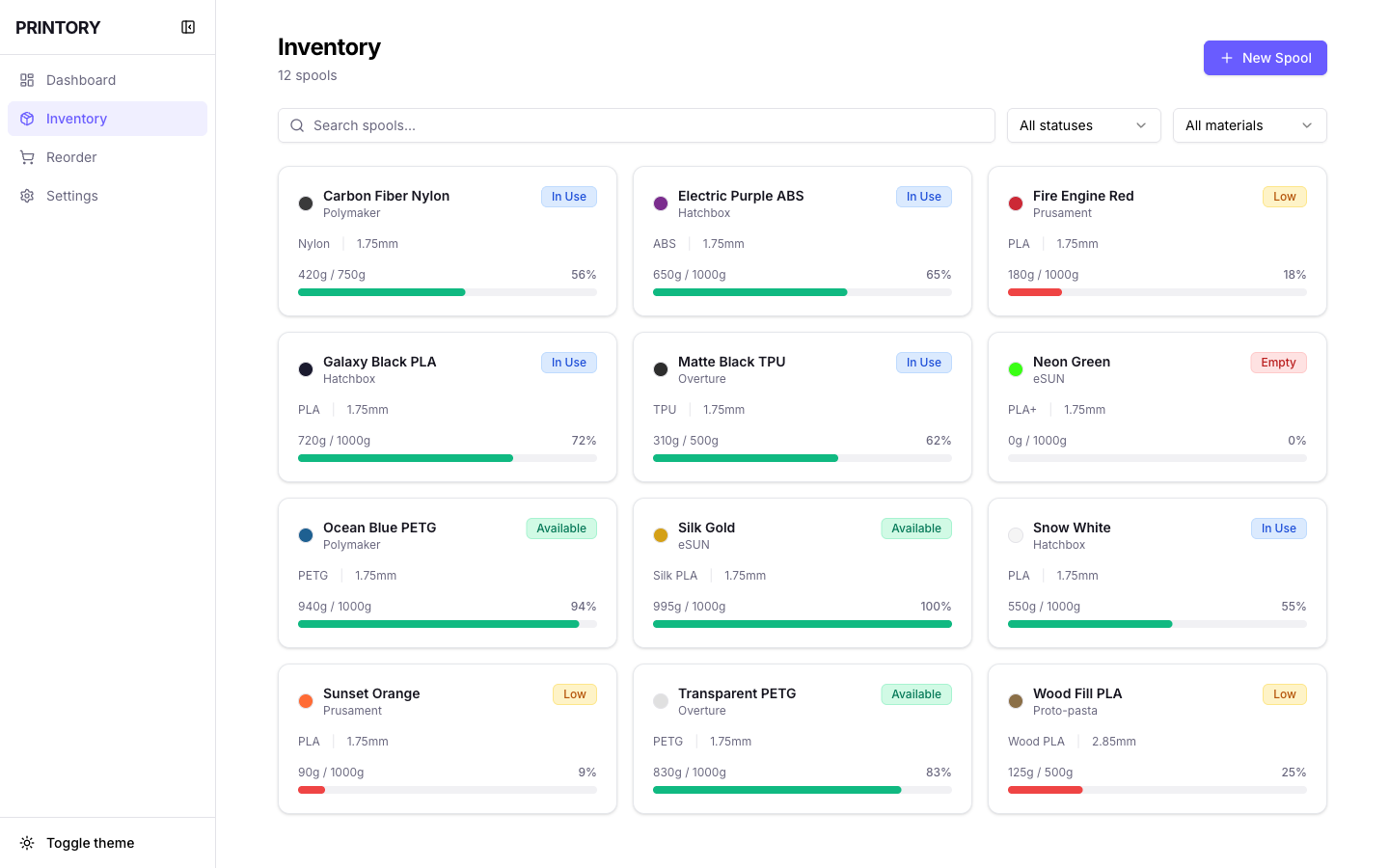
Printory inventory view showing organized spool tracking with color swatches and stock levels

Inventory view showcasing spool cards with color swatches, material types (PLA, PETG), stock percentages, and availability status—transforming inventory chaos into organized visibility.

Phase II

Rapid Prototyping

I built a functional prototype rapidly, focusing on core features first. This wasn't a clickable mockup—it was a real mobile app with working QR code scanning, local storage, and responsive UI. The streamlined development approach allowed me to validate the concept quickly and iterate based on real usage.

The architecture prioritized reusability from day one. I abstracted core patterns—data models, UI components, state management—anticipating that this inventory tracking logic could be adapted to other domains beyond 3D printing. This forward-thinking design would later prove critical when building HydroMate and Verdant Lab.

I deployed a working version to my phone early in the process. I could scan QR codes on filament spools, add them to inventory, log usage, and receive low-stock alerts. The focus on functional prototypes over static mockups enabled faster validation and better product decisions.

Core Features Delivered

  • QR code scanning with device camera
  • Spool library with color swatches and material types
  • Usage tracking and automatic inventory deduction
  • Low-stock alerts and reorder notifications

Core Features in Action

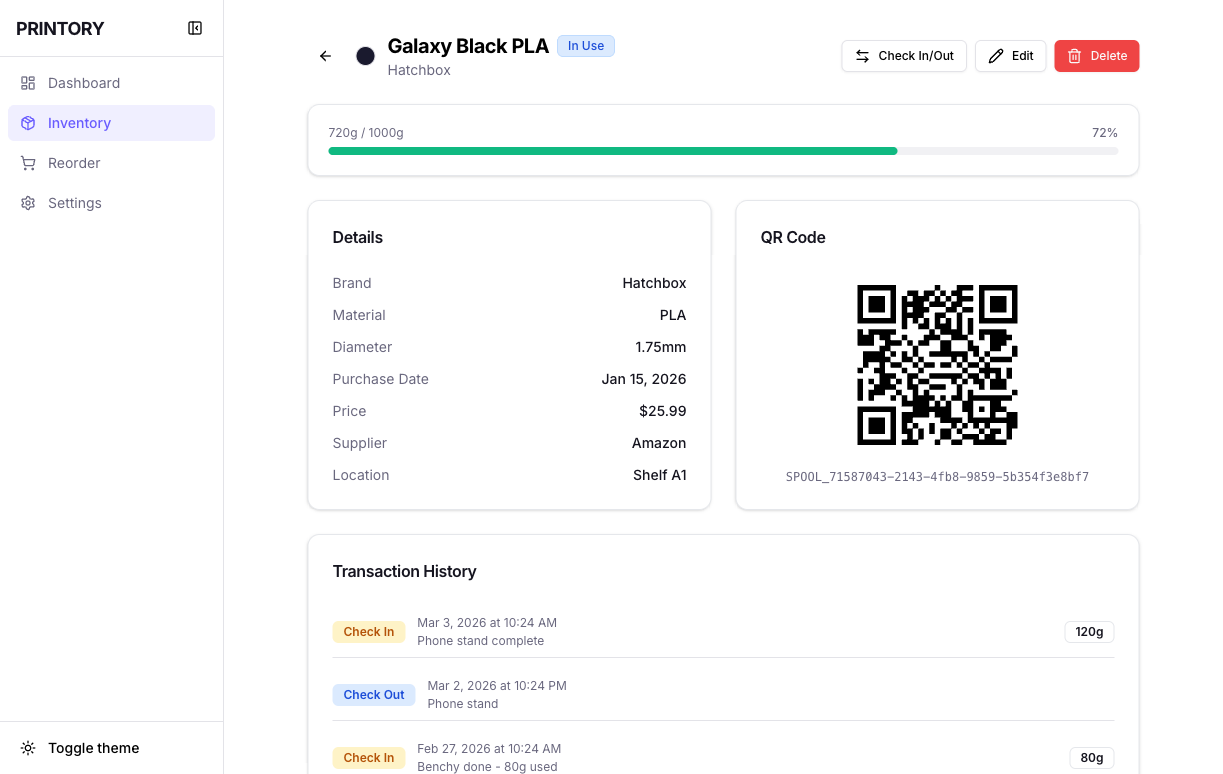
Spool details screen with QR code and color customization

Spool Details: QR code for scanning, color picker with RGB controls, and material identification—enabling precise inventory tracking.

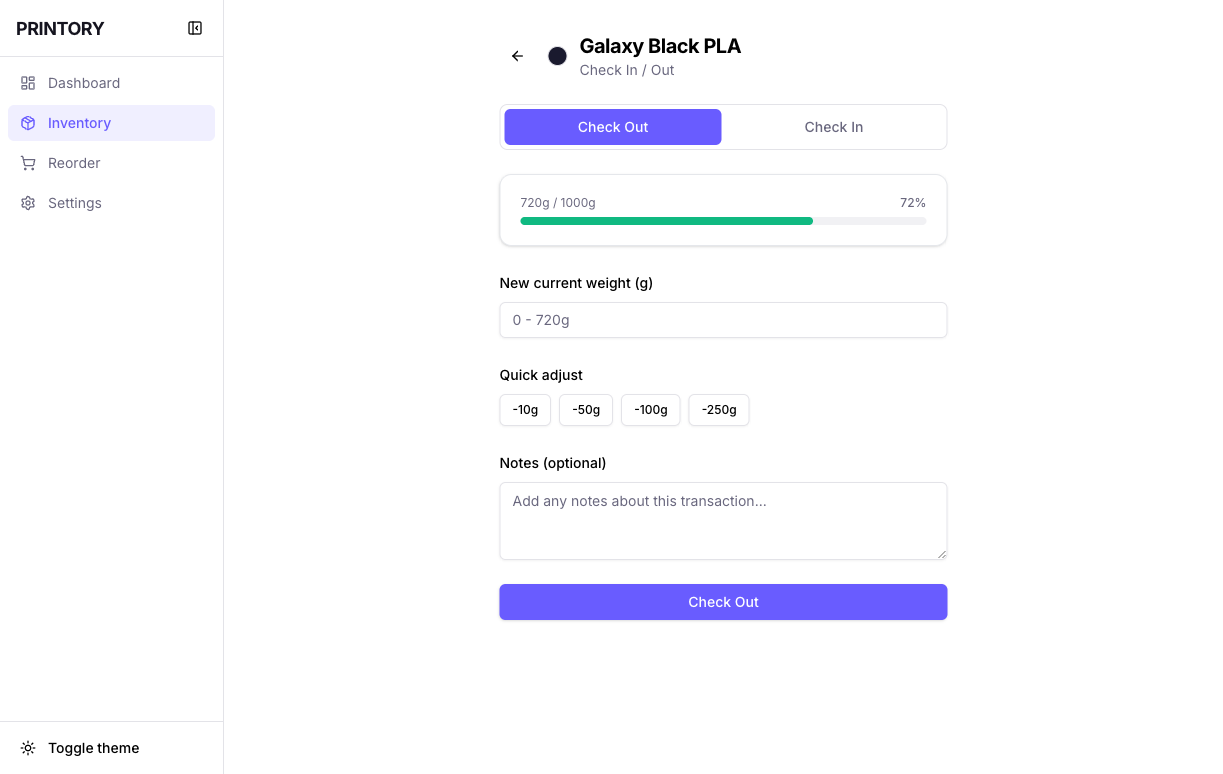
Check-in interface for usage tracking

Usage Tracking: Quick check-in with preset amounts (0g, 10g, 25g, 50g, 100g) for frictionless consumption logging.

Phase III

Camera Workflow Validation

Real-device testing revealed insights that desktop prototypes could never capture. Camera permissions, QR scanning angles, lighting conditions, and latency issues became immediately apparent when testing on actual iOS and Android devices in real storage environments.

I iterated rapidly on the scanning experience: optimized QR detection algorithms, added visual feedback for successful scans, improved low-light performance, and refined the camera framing UI. These mobile-specific refinements pushed the QR scan success rate to 98%—validating the technical feasibility of camera-based workflows.

Beta testers appreciated the frictionless experience: scan once to add a spool, scan again to log usage. No typing, no manual forms—just point, scan, done. This validation confirmed that QR-based inventory tracking could work at scale, informing future product decisions for other functional prototypes.

Mobile UX Improvements

Camera Optimization

Improved QR detection in various lighting conditions and scanning angles

Visual Feedback

Added haptic and visual confirmation for successful scans

Permission Flow

Streamlined camera permission requests with clear explanations

Error Handling

Graceful fallbacks for unsupported QR formats or scan failures

Frictionless QR Workflow

QR code displayed in spool details for scanning

Each spool generates a unique QR code for instant identification

1

Scan QR Code

Open camera and point at spool label

2

Instant Recognition

App identifies spool and loads details

3

Check In/Out

Log usage or check availability status

98% Scan Success Rate

Validated across lighting conditions and angles

Phase IV

Closed Testing & Architecture Foundation

After two months of iteration and refinement, Printory entered closed testing on Google Play Store with 12 active users managing hundreds of filament spools. The app proved that focused development could deliver production-ready products in compressed timelines—without sacrificing quality or user experience.

More importantly, Printory established a reusable component architecture that became the foundation for subsequent functional prototypes. The data models, UI patterns, and state management logic were successfully adapted for HydroMate (hydroponic tracking) and Verdant Lab (plant genetics research)—validating the architectural investment.

The project demonstrated a fundamental shift in how I approach product development: functional prototypes over static mockups, real-device validation over desktop simulations, and reusable architecture over single-use implementations. These principles continue to guide my design and development workflows.

Critical Lesson

"Building functional prototypes early unlocks experimentation that would be prohibitively expensive in traditional workflows. Invest in reusable patterns from day one, and compound the returns across future products."

Architecture Reusability Impact

Printory's component architecture became the foundation for two additional functional prototypes, proving the value of designing for reusability from day one.

Printory

Core Architecture (2 Months)

  • • QR scanning workflows
  • • Inventory data models
  • • Usage tracking logic
  • • Color/category systems
  • • Alert mechanisms

HydroMate

Adapted in 3 Days

  • • Reused QR scanning
  • • Adapted for plants/nutrients
  • • Extended tracking models
  • • Added grow schedules
  • • Hydroponic-specific alerts

Verdant Lab

Adapted in 3 Days

  • • Reused QR scanning
  • • Adapted for plant genetics
  • • Hierarchical tracking
  • • Lineage visualization
  • • Research-focused alerts

Rapid Adaptation Through Reusability

Two complete apps built in 3 days each by adapting Printory's architecture—proving that investing in reusable patterns compounds returns across future products. The same QR workflows, data models, and UI components were successfully scaled to entirely different inventory domains.

Project Impact Summary

2 Months

To Closed Testing

12 Users

Closed Testing on Google Play

98%

QR Scan Success Rate

Back to All Projects